IsoHappy Is Live
Every Tuesday I ship something. This week it is IsoHappy, a Mac app for getting your files back from old CDs, DVDs and disk images. It opens ISO, BIN/CUE, DMG and dozens of other image formats, plus the discs and drives connected to your Mac, reads scratched discs as far as they can be read, and finds files that were deleted. It is out now at isohappy.app, and browsing and previewing are free.
How it works
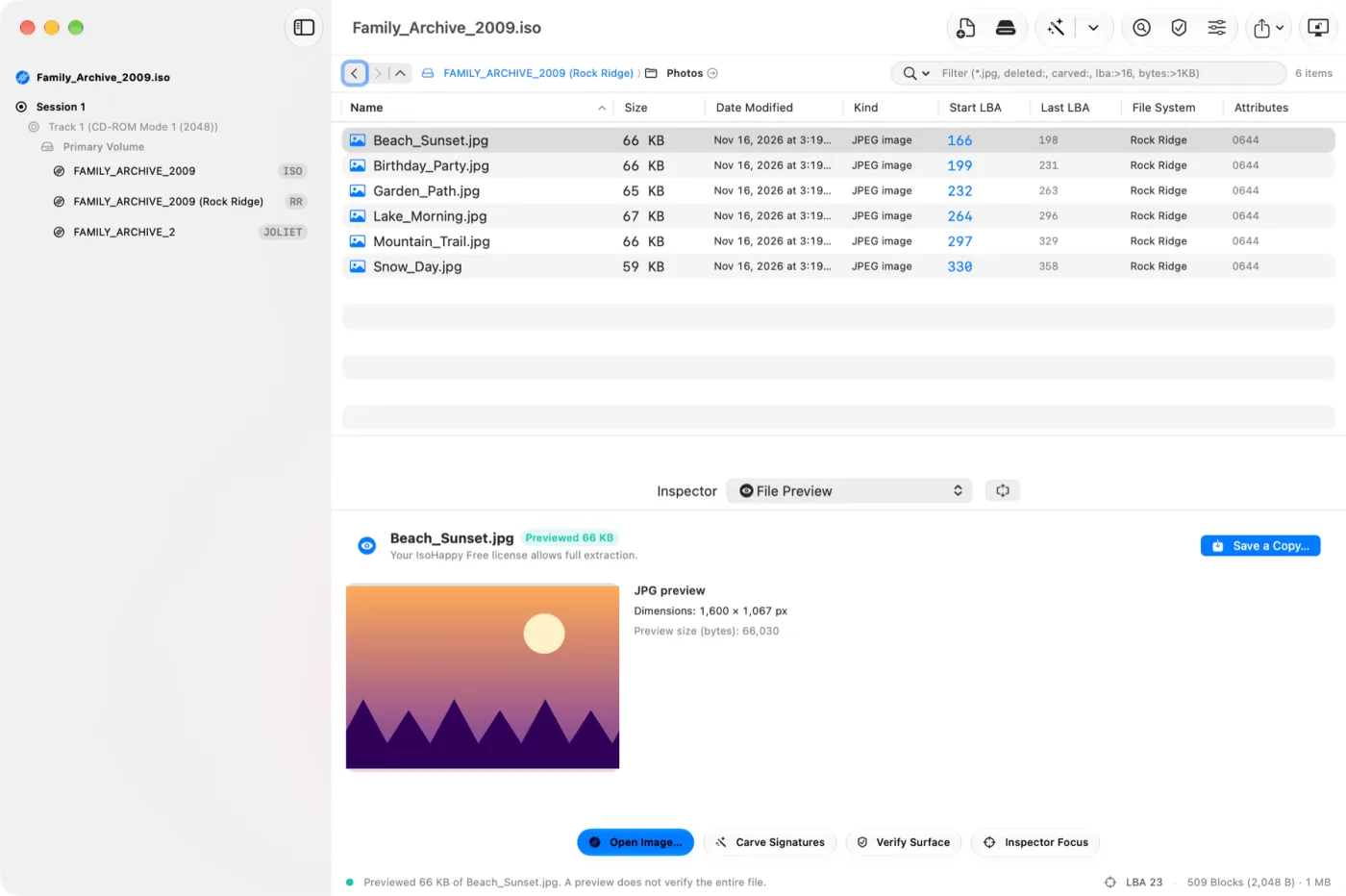
Open almost anything: ISO, BIN/CUE, DMG, forensic images like E01 and AFF, virtual machine disks, and formats from Amiga floppies to Xbox and GameCube discs. Open a file with an odd extension or none at all, and IsoHappy looks at what is inside and finds the file systems: Windows, Mac and Linux disks, CDs and DVDs. You can open the discs, cards and drives connected to your Mac the same way.
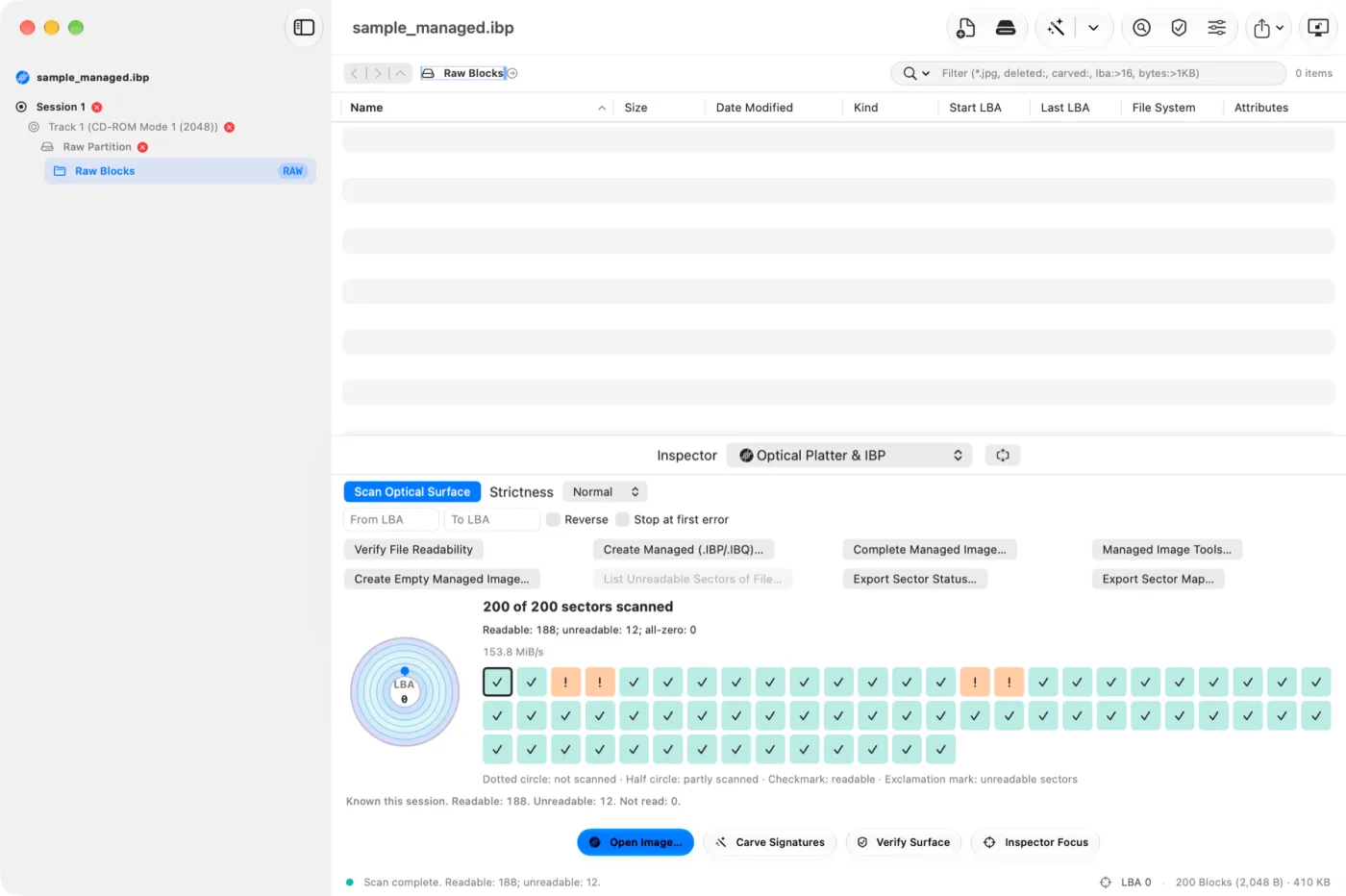
Read damaged discs: When a sector will not read, IsoHappy can try it again, read the damaged part backwards, and skip long bad stretches so a scratched disc takes minutes instead of hours. A surface scan maps which parts of a disc are readable. A managed image saves what reads today and fills in the gaps later, even from a second copy of the same disc.
Find deleted and lost files: IsoHappy lists deleted files the file system still has a record of. Find Lost searches a whole disk for partitions and folders that are no longer listed, and Carve Signatures finds photos, documents, audio and more by their contents when the folders are gone.
Look before you pay: Pictures, text, PDFs, audio and video open in a preview inside the app, including deleted files and files found by their contents. Audio CD tracks play right in the window.
Make and convert images: Save a disc, a drive or a single track as an image, convert BIN/CUE to ISO, and write an image back to a card or USB drive.
What it does not do
I would rather say this up front. IsoHappy’s optical drive features have been tested with simulated drives, not yet with physical ones, so if a disc in a real drive misbehaves, I want to hear about it. Some old image formats have no public description, so IsoHappy cannot open them yet; if you have one, send it and I will look. It does not burn CDs or DVDs, and it never decrypts console game data, such as the encrypted part of a Wii disc.
Why I built it
I have a box of CD-Rs from the early 2000s, and so does almost everyone I know: photos, school projects, a band’s first recordings. A lot of them are starting to fail, and the Mac has very little to help when Finder says a disc cannot be read. The best tools for this were Windows-only. I wanted a Mac app that tells you honestly what it can still read, saves as much of it as possible, and shows you your files before you spend a cent.
Privacy
Your files stay on your Mac. IsoHappy has no analytics, no tracking and no ads. It goes online only to check a license key, to check for updates, and to send feedback if you choose to.
Pricing
Browsing, previewing, searching for deleted files and scanning for bad sectors are free, and so is saving files from standard data CDs and audio CD tracks. Personal is $49, paid once, and saves deleted and recovered files, files from DVDs, game discs and Mac, Windows and Linux disks, and makes images. Pro is $99 and adds use at work, reports with CSV and DFXML, your own file types to search for, and partition editing. No subscription, and each license works on up to three Macs.
The app is in 15 languages, and so is isohappy.app, which has a full manual. IsoHappy needs macOS 15 Sequoia or later.
Download IsoHappy free at isohappy.app, or visit the IsoHappy app page.