Scrubb Is Not Live Yet
Every Tuesday I ship something. This week’s thing is Scrubb, and I cannot tell you it is live, because it is not.
The Mac version was rejected. The iPhone and iPad version has been sitting in Waiting for Review since Thursday. The website is up, the app is finished, and the only thing between it and you is a queue.
I would rather post this than post nothing and let the week quietly disappear, so here is the app, and then here is exactly where it is stuck.
What Scrubb does
Your photos carry more than the picture. Coordinates accurate to the building, the camera’s serial number, the exact second, the lens, the software you edited it in, sometimes a name and a copyright line, sometimes a thumbnail of what the image looked like before you cropped it.
Scrubb opens any photo or video and lays all of that out in plain language, with the location dropped on a map, and a note on each field about what it actually gives away. Then it removes what you choose: everything, or just the location, or individual fields you switch off one at a time.
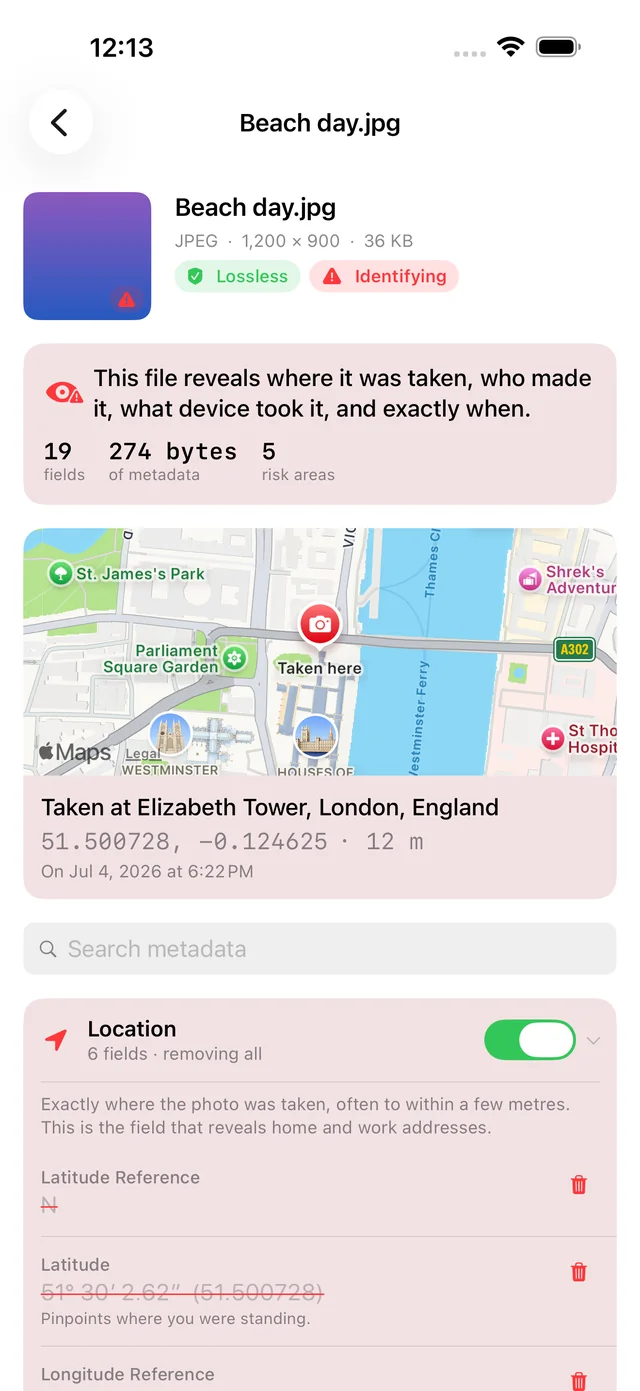
The part I actually built it for
Most metadata removers decode your photo, strip the tags, and re-encode it. You get back a softer JPEG than the one you handed over. You have traded image quality for privacy without being told that is the trade.
Scrubb does not touch the pixels. It rewrites the container around the image and copies the compressed picture across untouched, so a cleaned file keeps its original format and its original quality, byte for byte where the picture itself is concerned.
Then it checks its own work. Every file Scrubb writes gets re-read before you see it: the image must still decode, match the original’s dimensions, hash to the same pixels, and contain none of the fields you asked to remove. A file that fails any of those four checks is deleted rather than handed to you.
Camera RAW files are refused outright. Their layouts are proprietary and a bad edit destroys a negative you cannot recreate, so Scrubb inspects them and exports a cleaned JPEG or HEIC instead of rewriting the original.
And it has nowhere to send anything
The free online metadata strippers all have the same problem: they ask you to upload the exact file you were worried about. Scrubb has no server, no account and no analytics. Everything happens on your own device. The single exception is turning a coordinate into a place name for the map you are already looking at, and that request carries a coordinate and nothing else.
Where it is stuck
The Mac submission came back rejected. The cause was small and entirely mine: you could close Scrubb’s window and then had no way to open it again, because I had removed File ▸ New Window. Apple is right that this is broken. It is fixed, build 3 is prepared, and the resubmission is queued.
The iPhone and iPad build went in on Thursday and has not been looked at yet.
So the honest count for the week is one app finished, zero apps live. When it clears I will say so, and the app page will pick up its App Store buttons then. Until that happens it carries a Coming Soon badge, because linking you to a store page that 404s would be worse than admitting the delay.
Pricing, when it does land
The inspector is free forever. The first five exports are free and full strength: Scrubb will never strip only some of your metadata to push you toward paying. After that, $7.99 once unlocks unlimited exports across Mac, iPhone and iPad. Not a subscription.
It handles JPEG, PNG, HEIC, WebP, GIF and QuickTime video, and it is a Serious Business Software app.
More at scrubb.app.
What’s next
More next Tuesday, and hopefully an approval before then.